


If you’re new to the GTM Engineer Experiment Series, a big part of my job working in growth and GTM Engineering at startups like Hearth, Rippling, and now Netic is trying out a lot of new products and running experiments. I was an early user of many now popular GTM engineering tools like Clay, HeyReach, and PhantomBuster.
Since GTM alpha comes primarily from ideas, software, and workflows that others haven’t found yet, I try new tools and ideas often.
In this series, I (and members of The GTM Engineer Lab) document what works, what doesn’t, and what we think is really going on. You should be able to take learnings from these experiments and apply them to your own job (and you’ll have to tell us what works! Just email us at hi@thegtmengineer.ai).
Today, I’m sharing how Nico Druelle, founder of The Revenue Architects, a GTM Engineering studio that works with companies like Descript, WorkOS, and Linear, found a winning middle ground to build scalable GTM systems for every one of his clients.
Instead of using UI-first software tools or completely custom coding something himself, Nico relies on Cargo to build flexibly in code while maintaining out of the box observability, data connections, workflows, and more.
I know a hundred people that could tell you what to go build into your GTM Engineering architecture - backend data tables for your key objects (like people, companies, signals), a stocked TAM, intent signals, SDR automations, account scoring, etc.
But, there are very few people that know how to actually build the architecture from the ground up in a fast, affordable way. It’s because tools are disconnected, finding comprehensive TAM data is exhausting / expensive, and there’s a long tail of nuanced workflows (like entity resolution). This is also why GTM Engineers are such a hot commodity, and why Nico gets to be extremely selective in who he chooses to work with.
Nico is one of the few people that deeply knows how to build the architecture, and he is choosing to build those systems on top of Cargo for a reason.
Setting up the data connections, stocking the TAM, managing and monitoring agents, etc takes a lot of effort to build from scratch, but if you use a system, it needs to be flexible enough to the customization needs of your business. Cargo allows you to bring good taste in what to build (like Nico has) and turn it into something running, versioned, quick to update, and observable. This can increase the number of people that know how to actually build the architecture correctly and effectively.
In this essay, I’ll walk through precisely how Nico builds these systems and how you can do the same thing at your company (or agency/studio!).
Seeing how Nico is using Cargo as the best of both worlds system, is why I was excited to partner with Cargo to write this post. Thanks to Cargo for supporting and sponsoring the GTM Engineer community!
So what is Cargo?
Building the right GTM system yields clean, comprehensive data, it helps your sellers focus on the most important accounts, and it helps your marketers move faster with more precision.
Setting these systems up is time consuming and challenging, often spread out across many different tools.
Many of the GTM system builders today are designed for a non technical person to use by clicking through a builder. To make updates to a workflow in these tools, someone has to manually apply each change, which quickly becomes time consuming and messy when trying to make system updates at scale.
Cargo on the other hand treats all workflows as code, on top of integrations with all of the third party providers you need. The code does the same thing as the systems built in workflow builders, but the agents can create and edit the workflows, instead of you needing to do it manually. When you have access to workflows in code, it also opens the door for new workflows to be built (like automating an entire SDR’s research process).
The system you build in Cargo runs on top of and writes back to your own database rather than sitting beside it. Plus, its observability layer lets you monitor all workflows being run so you can see if anything breaks. Best of all for studios like Nico’s, the code is easily pushed and pulled into new workspaces.
Why Nico decided to use Cargo
For anybody deep in Silicon Valley growth land, you have probably heard about the French growth mafia. My French growth friend Achkan, used to say: “In France, we didn’t have the same Silicon Valley VC money, so we had to get hacky and creative with growth.”
Out of France has come some of the best growth leaders (like Guillaume Cabane) and some of the best growth software (like Cargo, Dust, and Aircall).
The French growth mafia tends to stick together, and whenever I see a growth person (or software tool) out of France, I know to pay attention.
Nico knew the Cargo team from French growth communities, and when he decided to start a GTM Engineering studio, Cargo asked if he would help them build for a few of their customers.
As Nico grew the studio, he has brought Cargo along every step of the way, and the product has continued to adapt to support his (and his clients’) needs. He liked using Cargo because it was on top of the database, it gave him complete flexibility to build GTM systems, and it was easy to transfer his work from client to client without starting from scratch.
It also has a long tail of impactful features like a Slack agent that opens PRs based on sales feedback and sophisticated entity resolution out-of-the-box.
When Nico finishes client relationships, he has even been able to hand off Cargo, without any churn.
Exactly how Nico builds growth infra with Cargo
Here’s exactly how Nico set up this GTM architecture, in detail:
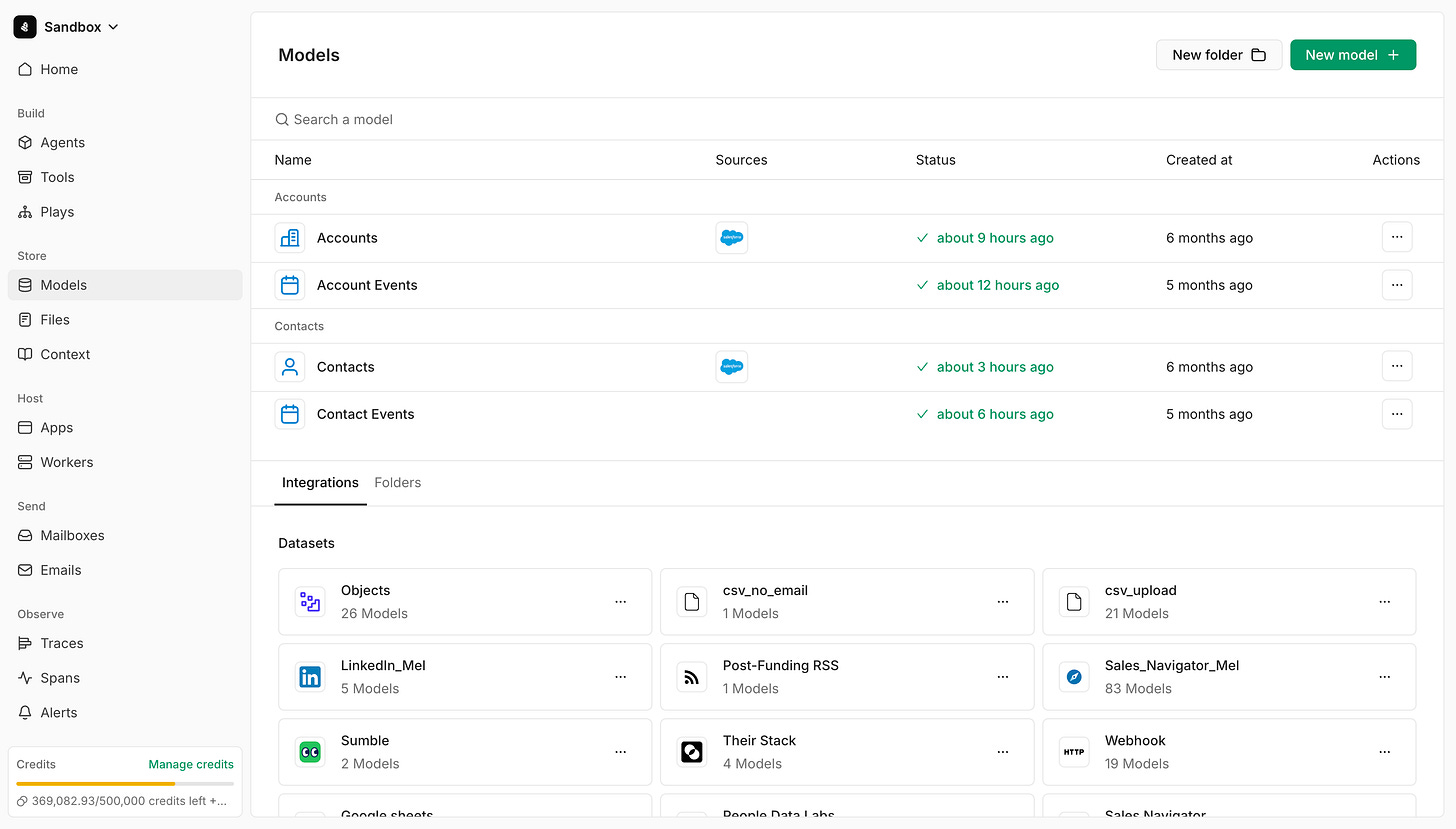
Stood up each client on their warehouse, built the data models, and stocked the TAM
The client either connects their existing database or Cargo provisions an empty Snowflake instance that natively becomes a system of record.
Then, Nico sets up 3 key backend data tables for each company - contact data, account data, and signal data. He can add columns, relationships and computed fields directly from the CLI so that a client workspace is something he can version instead of click through.
Cargo has the concept of data models, so Nico can build custom views on top of the data tables to take actions like create paid ad audiences.
Everything that runs in Cargo gets written back as JSON, so the client’s data team can query what the GTM system did.
When needed, Nico then uses Cargo to stock the TAM. It sits on top of data enrichment providers (and agents) that can help build a comprehensive TAM with LinkedIn, email and phone number data. This all writes directly back into the data warehouse.
Pulled his existing workflows out of GitHub instead of rebuilding them
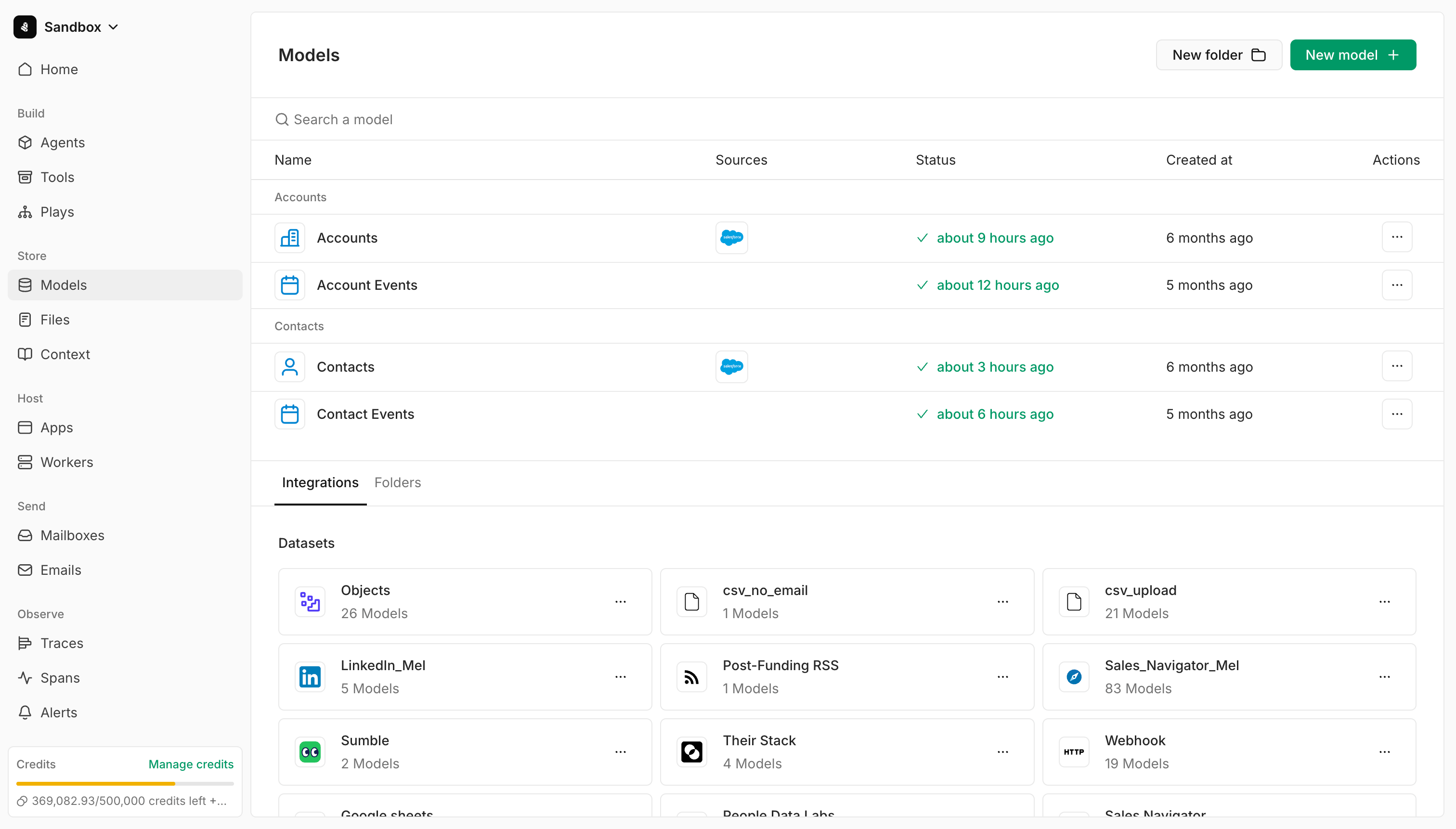
Cargo has useful workflows out of the box to get started, and they allow you to bring your own custom ones as well.
These are split into “plays” and “tools.” Plays are trigger-based (e.g. opportunity is created in Salesforce) and tools are on-demand runs that happen either manually, via API, or via cron job (e.g. every day fetch new LinkedIn posts from a given user).
Nico has built a repository of these impactful workflows that he uses with his clients including:
Signals across things like champion tracking, new hire alerts, and custom data points that agents go out and find.
Rep enhancements to score accounts based on custom prioritization models and to suggest the next best action to take.
SDR automations like account research and prospecting. For example, they built a workflow for the SDRs at one client to save 3-4 hours in prospecting time by replicating the rep actions with agents.
Put the exposure layer in Slack
A Cargo agent sits in Slack, and a Cargo bot reads feedback from the reps and their managers to recursively improve the system. Instead of someone needing to log into Cargo, the bot opens a PR to resolve the issue that Nico’s team can review.
For anybody that has worked with sellers and triaged their feedback to make system improvements, this is a game changing feature. Imagine logging in with a PR ready to review solving the exact issue your team requested.
This not only improves the system, but it increases the pace at which your system gets better. When sales has to wait days (or weeks) for requests to be resolved, they eventually stop asking. But, you actually want them to ask, because it means that your system will get better, faster. Just don’t forget to exercise your own judgement about what to change vs. not :)
Stopped building in the UI and started writing workflows exclusively through Cargo’s CLI
About three or four months ago Nico’s team stopped building anything in Cargo’s UI. They scope and design the workflow, then an agent writes it through Cargo’s CLI. Builds that used to take a day or two now take just a few hours. The SDR automated account research work was built this way.
Improvements with one client in one instance transfer across the rest
If a GTM engineer at WorkOS finds that adding an Exa node improves coverage on the contact sourcing workflow, Nico is able to have an agent ship that change to all of his clients’ Cargo workspaces using a similar workflow.
Nico has an admin level view for all of his workspaces that he can easily traverse. This means that the GTM systems he runs for his clients are constantly learning from one another.
Built anything else he could think of inside of Cargo
Because of all the data connections and custom code in Cargo, Nico has built a full repository of useful workflows and actions. A few of these include:
Territory management for the reps on top of their fit scores and account data that can write straight into the CRM.
Sending custom audiences to the ad platforms for marketing.
Sophisticated de-dupe and entity resolution.
What makes Cargo uniquely suited for this experiment
Three things make Cargo uniquely equipped to support all of this work for Nico and The Revenue Architects:
1). The ‘do it in one place’ functionality: Out of the box, Nico can set up warehouses, map the TAM, and start running automations. He can pull in his own code, access it via MCP, and much more. Cargo offers all of the tools you would need to actually go and build the underlying GTM architecture. Most GTM Engineers I’ve met know intuitively what to build, but struggle with how to build it given the nuance and complexity. A tool like Cargo helps bridge this gap and lowers the bar to entry for building custom, scalable, and observable GTM systems.
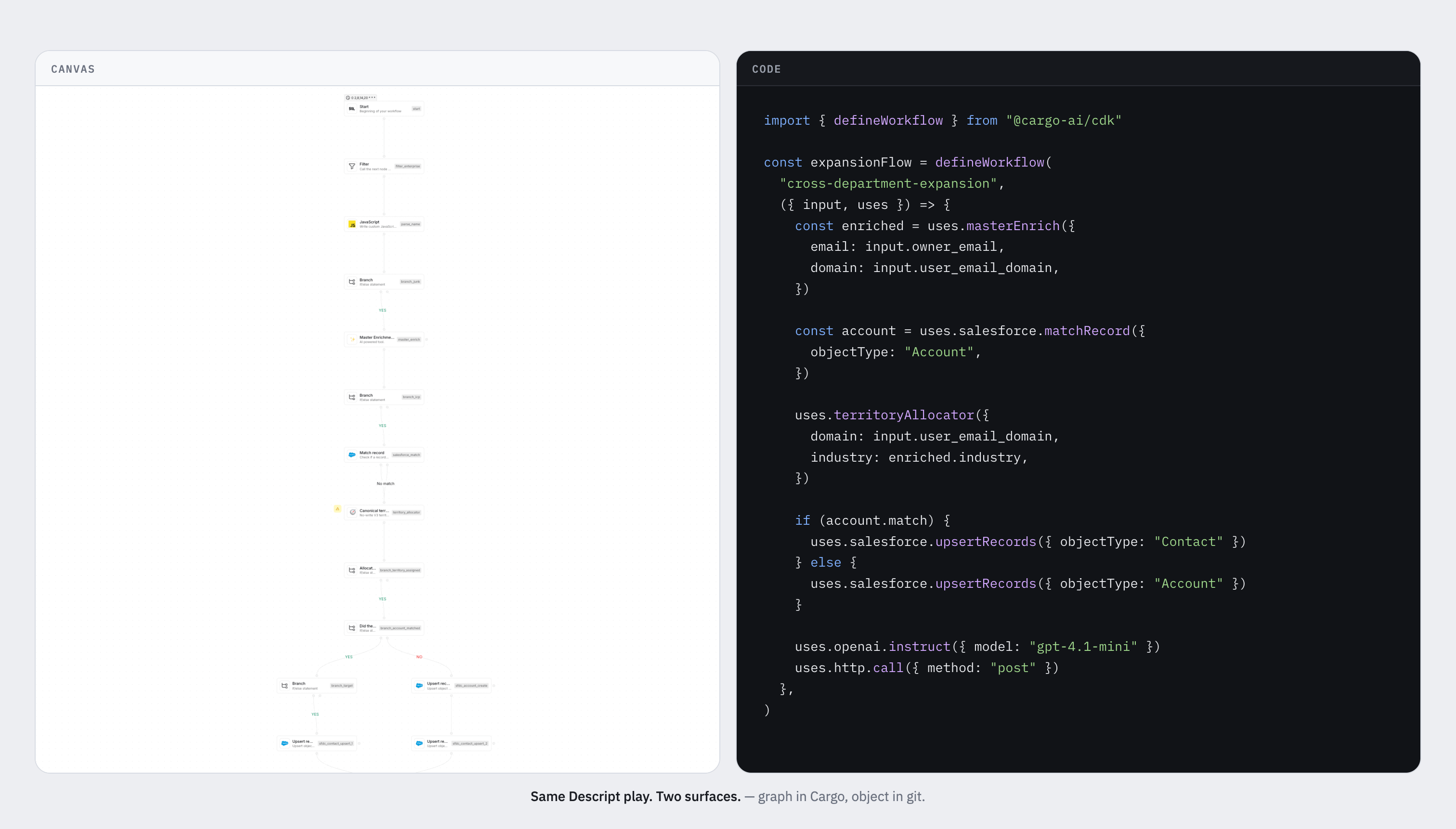
2). What you build is portable: A workflow built in Cargo is an object written in code, not a configuration sitting inside one workspace. That’s why Nico can deploy the same contact sourcing workflow into a new client, and push a simultaneous fix to a workflow that multiple clients use. Everywhere else in GTM tooling, what you built stays where you built it, and an agency/studio ends up maintaining many copies of a system that quietly drift apart.
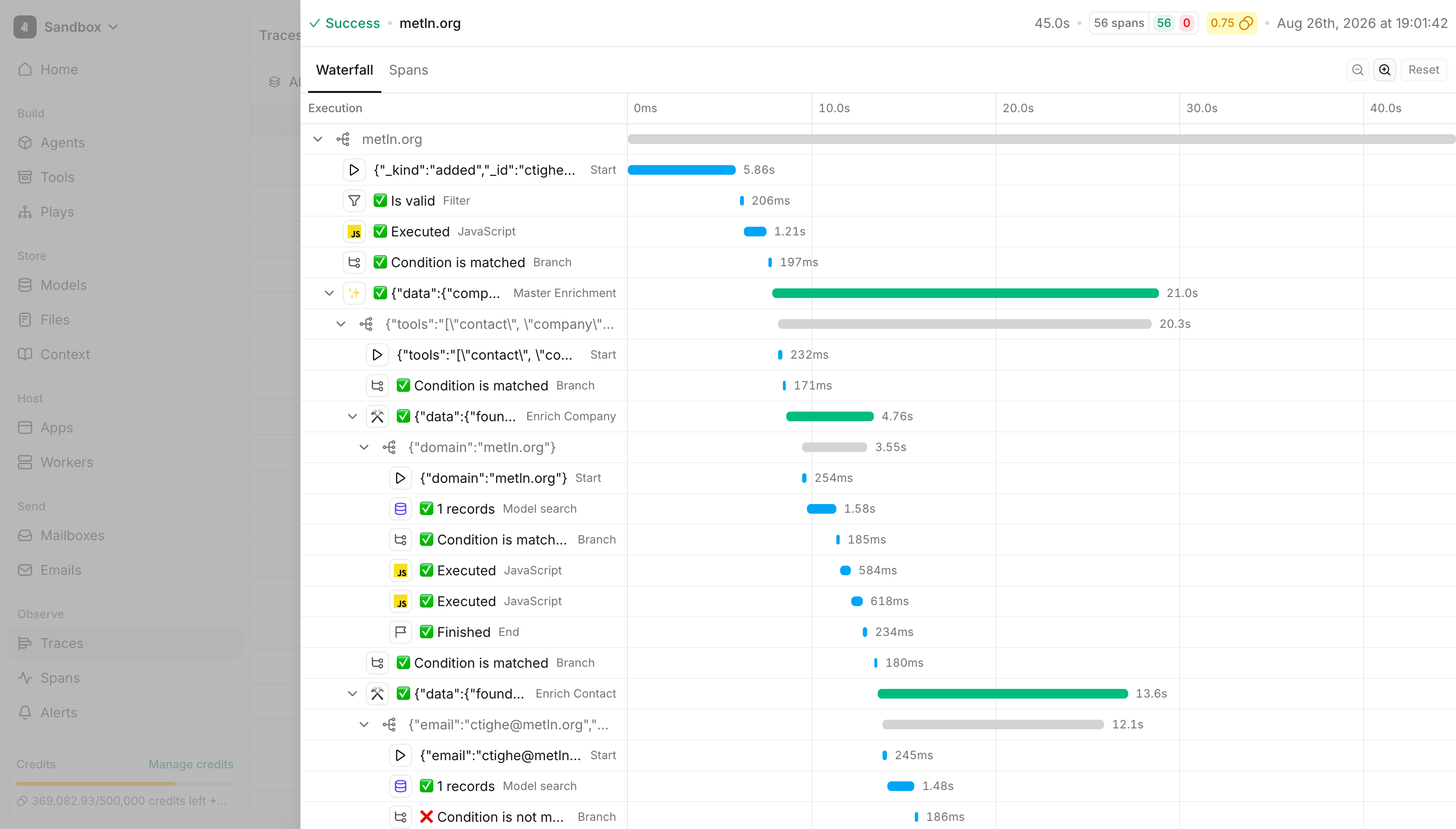
3). Observability is what makes it safe to leave running: Cargo recently shipped traces and alerts, so teams can comfortably let workflows run. When things do break, because all workflows are written as code, an agent can troubleshoot what’s failing and quickly ship a PR to remedy the situation.
Final thoughts
Most GTM engineering work gets rebuilt more often than anyone admits. Agencies have to do the most rebuilding work, because one workflow improvement needs to be shipped for every client.
What I like about how Nico scaled The Revenue Architects work is that he treated his client work like a product. There’s a repo, there’s a latest version, there’s a review process before a change goes out, and there’s an enablement conversation with the client. If you want to set up something similar at your company, here’s what matters most from Nico’s experience:
Build your entire workspace in code
By having your tables, triggers and workflows all in code, with clear observability, you can move way faster and more flexibly. You can guide agents to build the actual scripts themselves, and you can use agents to reason over existing workflows when you need to troubleshoot bugs or ship updates.
I’ve seen firsthand how painful it is to dig up and debug an old automation you built months ago in a UI-based tool. Putting everything in code makes this an order of magnitude more efficient.
Do the key foundation work before trying to build workflows
Before building fun signal workflows like champion tracking and new hire monitoring, Nico makes sure his clients have their foundations in place. He sets up contact entity resolution first, then builds the account layer with custom data points and scores. Only then does he move on to building signals, because those workflows depend on reliable account and contact record data.
Keep sellers’ workflows simple
No SDR at Nico’s clients needs to log into Cargo. They work in Slack, Salesforce and their email sequencing tools. The orchestration happens behind the scenes. If your reps have to learn how to operate technical tools in your GTM stack to get value from them, you’re setting yourself up for failure.
Templates can’t replace company specific needs
The repo Nico’s studio has built helps him get clients started, but he still needs to customize the systems to their unique needs. The exact logic and workflows to prioritize setting up will always be company dependent, and change based on how a company sells. Finding systems that are flexible to adapt to these needs is critical to be able to scale with your underlying technology.
Thanks for reading! Let me know if you try this out and reply to this email if you have a GTM Engineering Experiment you’d like featured :)